
Calibration (CAL) Mode
Introduction
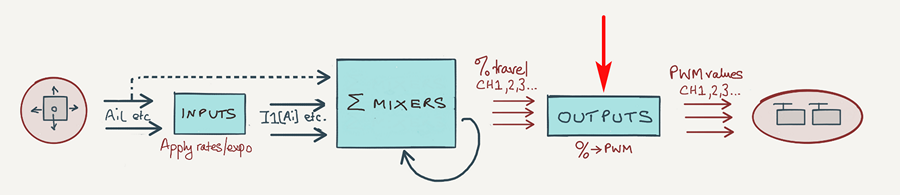
In this article, I will explain how to add a special 'CAL' mode to your setup, for calibrating the outputs. This will allow you to generate mixer values of -100%, +100% and 0% on demand.
Adding a CAL mode to your setup
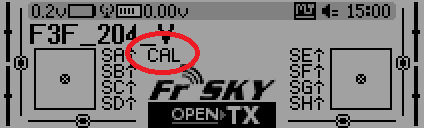
To implement a CAL mode, you'll need to add a special 'Replace' mix to each servo channel. I call this mix a 'CAL' mix.
When the CAL mix is active, all other mixes for that output are ignored. The job of the CAL mix is to generate reference values of -100%, +100% and zero using a stick or knob.
Here's an example of a CAL mix for the elevator channel. The calibration is controlled using the elevator stick:
CH1:Elevator
[mix 1] ...
[mix 2] ...
[CAL mix] Src=Ele wt=100 Multiplex=REPL Trim=NO FlightMode=FM1:CAL
Moving the elevator stick between the end points will generate mixer values -100% to +100% which are passed directly to the CH1 elevator output.
The CAL mix in detail
This section explains the special mix in more detail.
Setting up the CAL mixes
For each servo channel, add a mixer-line to the end of the mixer list:
- Mixer name = 'CAL'
- Source = [stick used for calibration, see below ]
- Weight = −100% or +100% (see below)
- Offset = 0
- Diff = 0
- Include Trim = No (bypass trims)
- Flight mode = FM1 (optional, see below)
- Multiplex = 'REPL' (replaces all prior mixer lines above for that channel)
Source is any convenient control - it need not be a flight control. However, it must be a raw control like Ele, Ail (do not select inputs like [I1]Ail as these include rates and expo).
For calibrating pairs of surfaces like flaps or ailerons, use a single control and arrange for the surfaces to move in the same direction so you can equalise them by eye. For example, here's a typical scheme for a sailplane:
- Aileron stick -> calibrate 2 ailerons
- Throttle stick -> calibrate 2 flaps
- Elevator stick -> calibrate elevator (X-tail) or 2 V-tail surfaces (V-tail)
- Rudder stick -> calibrate rudder (X-tail only)
Activating the CAL mixes
The CAL mixes may be activated directly via a switch, or indirectly via a dedicated flight mode.
The flight mode method has the advantage that the flight mode is displayed on the screen, but requires that you use FM1 (the highest priority mode), so that it's available on demand. If this is inconvenient (maybe you already have flight modes assigned), then the direct switch approach is fine.
Setting output direction
To make the calibration procedure consistent, set Direction in each output so that:
- A +ve change in Min, Max or Subtrim moves the control surface up or to the right.
- A -ve change in Min, Max, or Subtrim moves the surface down or to the left.
The easiest way is to try it. Go into the servos menu. Then for each servo adjust Subtrim back and forth, and see which way the control surface is moving. Reverse the output if necessary. Note that if an output is reversed, all the mixers affecting that output must also be reversed.
Example integration
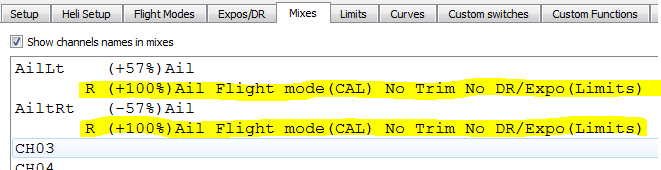
Below is a screenshot from OpenTx Companion, showing two aileron channels and the extra CAL lines. The 'R' at the beginning denotes a REPL directive.
Demo file
Hardware calibration
For correct operation of your radio, remember that your sticks must also be properly calibrated as well! This is achieved via the OpenTx hardware calibration menu (Long press Menu -> Page x 8)